
Charlotte Humberston ·
The Salesforce DevOps lifecycle: diagnose where your team stands
If your team builds on Salesforce, it's highly likely that you've implemented some form of DevOps already, whether that's version control, CI/CD or even automated testing. Most teams get going this way: they fix the most painful problem first and build outward from there. It works, but it tends to leave you with a patchy picture. Some parts of your delivery process are solid, others have quietly been left behind, and it's hard to know where you are without stepping back and looking at the bigger picture.
That's where the Salesforce DevOps lifecycle can help. It provides a complete map of the work involved in delivering changes, from initial planning right through to monitoring and improving what's live. As well as explaining what the lifecycle is, this post will help you use it to diagnose where your team stands in terms of DevOps maturity.
Work through each stage, ask some honest questions, and find the gaps where your team has tools but no process, or no coverage at all. With the help of the State of Salesforce DevOps 2026 report, we'll show you how your team compares to others in the wider ecosystem too.
What is the Salesforce DevOps lifecycle?
The Salesforce DevOps lifecycle is a continuous, iterative model which shows how development and operations unite. It's usually shown as an infinity loop, because delivery never really stops: you plan, you build, you ship, you learn from what's running in production, and then that learning feeds straight back into the next round of planning. There's no finish line, just a loop that gets tighter and more reliable as you improve.
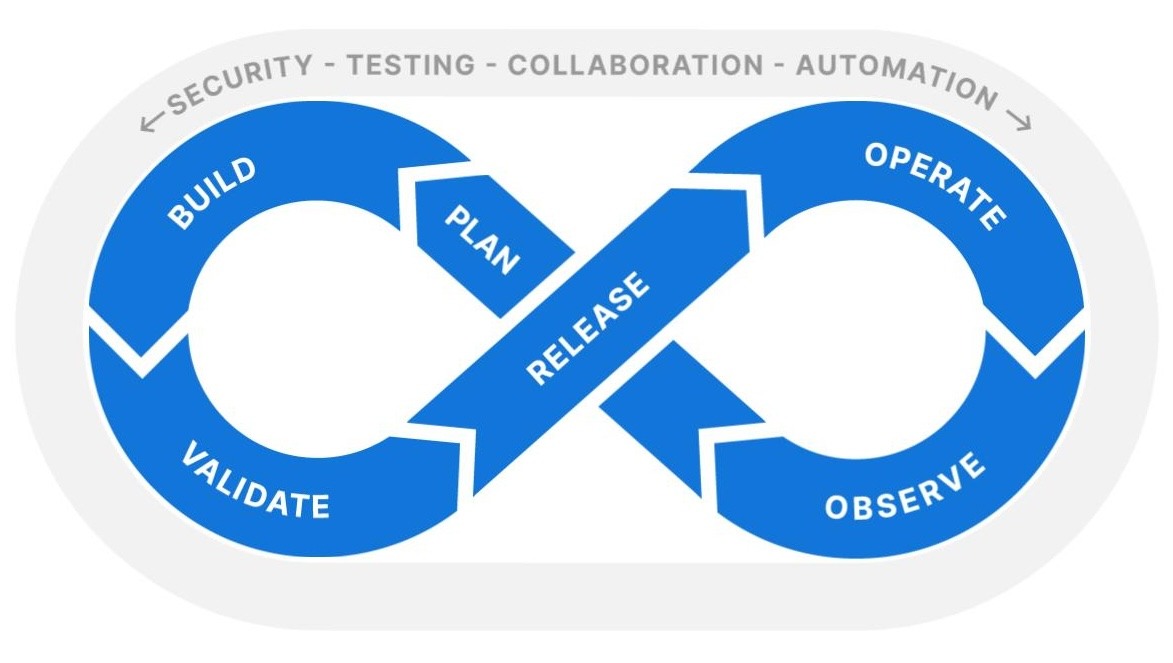
For Salesforce teams, that loop has six stages:
- Plan: Deciding what to build and how you'll know it worked.
- Build: Developing changes, whether that's Apex, Lightning Web Components, or clicks-based config.
- Validate: Testing and reviewing changes before they go anywhere near production.
- Release: Deploying to production safely and predictably.
- Operate: Keeping production healthy, including backups and data protection.
- Observe: Understanding what's actually happening in your org once changes are live.
According to the State of Salesforce DevOps 2026 report, 87% of Salesforce teams have already implemented or are looking to implement DevOps tools and practices. The lifecycle provides a robust framework for that work — and increasingly, is the baseline expectation for any team building on the platform.
Diagnosing your team: stage-by-stage
At every stage of the lifecycle, we recommend that you ask yourself (or your team), these questions:
- Do we have both tools and a process here? A tool which is inconsistently used or not well documented is of little use.
- Are our tools for this stage well integrated with the stages at either side? Handoffs are an area where work is at risk of falling through the cracks.
- Is the whole team able to participate, including no-code colleagues? A stage which only developers touch has a significant blind spot.
- Do we encounter any recurring problems here that we've learned to live with? Fixing issues at their source rather than papering over them is significantly better for the long-term health of your org.
Across every stage, Salesforce teams are consistently more likely to have adopted tools than to have defined processes around them. Buying the tool is the easy bit. The gap between "we have a tool" and "we have a reliable, repeatable practice" is where most teams fall down. So when you answer that first question, be honest about which parts you actually have in place.
Plan
Planning is where you decide what to build and, crucially, how you'll know it succeeded. Strong planning doesn't stop at what the feature looks like, or what it includes — it also covers how the change will be tested, released, and monitored once it's live.
Planning is often the least formalized stage of all. Work gets prioritized in a backlog, but the downstream questions rarely get asked up front.
Ask your team: When we plan a change, do we ask how we'll monitor it in production? Do admins and developers plan together, or in separate conversations? Is planning connected to the work that follows, or does it happen in a tool that nobody refers back to once the feature is built?
What good looks like: In an ideal world, planning has every single stage of the lifecycle in mind. If "how will we observe this once it's live?" is part of the planning conversation, you're shifting the right instincts to the very start of the loop.
Build
Build is where changes get made — Apex, LWCs, Flows, config. It's the focus for most teams, with 51% saying they spend most of their time in the Build stage.
It's also the most mature stage in the ecosystem, with 68% of Salesforce teams having both tools and a defined process for Build. This is where version control lives, with Git acting as the single source of truth for all metadata, and where a branching strategy keeps parallel work from colliding.
Ask your team: Is everything in version control, including declarative changes? Are automated code reviews running during the build, or are we still finding issues at — or after — release? Does every contributor work from the same branching model, or are some team members following their own? Are we honest about having a single source of truth?
What good looks like: Every change should be captured in version control, code should be reviewed automatically as it's written, and no-code colleagues should be able to take part in the build process. The earlier you catch a problem, the cheaper it is to fix. That's the whole idea behind "shifting left", and the Build phase is where it starts.
Validate
Validation is your safety net — it's the testing and review process that happens before a change is allowed to progress. This is the home of continuous integration (CI), and where every merge should trigger automated tests so any problems surface here, rather than on release day.
Validation tends to be strong for teams with a healthy Build stage, but it's also where teams struggle when trying to scale their process. Testing bottlenecks are the single most common barrier to scaling delivery, cited by 38% of teams. And there's a telling signal in the data: 18% of Salesforce teams are primarily finding and fixing issues in production. If your team is one of these, validation isn't doing its job — problems are slipping past it and being discovered live, when they cost more to fix.
Ask your team: Is CI running on every merge, or only before major releases? Do we rely on manual testing that doesn't scale, or is prone to human error? Are we meeting Salesforce's 75% Apex code coverage requirement because we test well, or just scraping past it?
What good looks like: Teams should have automated tests running continuously, test automation that grows with their org rather than capping their release cadence, and the confidence that if a change is broken, validation will catch it — not the users.
Release
Release is the deployment itself: getting changes into production safely and predictably. For Salesforce teams, this is often where they first feel the pain of manual change sets, and where they usually begin their DevOps adoption journey.
63% of Salesforce teams have both tools and a defined process for the Release stage — the second highest after the Build stage. This makes sense, as it's the most visible stage, and the one where a bad day is most obvious to everyone. Encouragingly, 60% of teams now release to production weekly or more often, a cadence that simply isn't sustainable with fully manual deployments.
Ask your team: Can we deploy without release-day anxiety? Do we have a tried and tested rollback plan if something goes wrong? Is our release process documented and repeatable, or does it live in one person's head? Have we efficiently automated parts of the process that don't require manual intervention?
What good looks like: Deployments should be routine rather than dramatic. A mature release stage is one where CI/CD pipelines handle the heavy lifting, releases are frequent and low-stress, and teams can roll back a change as confidently as they shipped it.
Operate
The Operate stage is about keeping production healthy once changes go live. On Salesforce, that primarily means protecting your data and metadata. Backup and restore tools and processes sit right at the heart of this stage.
10% of Salesforce teams have no tooling or process for Operate at all. But the more worrying problem is the larger group who think they're covered, and who won't find out they're not until a major incident occurs. Having a backup tool is not the same as having a tested recovery process. That distinction is exactly what the four diagnostic questions we provided earlier are designed to expose.
Ask your team: Have we actually tested whether we can restore from our backups, or do we just assume we can? When did we last run a real restore? Do we know who owns data protection, or is it nobody's explicit job?
What good looks like: Backups which teams have proven they can restore from, under realistic conditions, before they ever need to. A backup which has never been tested isn't a reliable safety net. If you're not sure where to start, implementing a robust Salesforce backup tool is one of the highest-leverage gaps to close on this side of the loop.
Observe
Observe is understanding what's genuinely happening in your org once changes are live — performance, errors, user impact, and the health of your org. It's the stage that closes the loop and feeds into the next round of planning.
It's also, by a clear margin, the most neglected stage in the lifecycle. Just 36% of Salesforce teams have both tools and a defined process for the Observe stage — the lowest of any stage — and 17% have nothing at all. The confidence data tells the same story: only 21% of teams feel extremely confident in their Observe stage, compared to 35% for Build.
Ask your team: How do we find out when something breaks in production — from a dashboard notification, or from an angry user? Is feedback from end users still the primary way we discover issues? Do we have visibility into org health, or are we developing blind after every release?
What good looks like: Effective monitoring should be in place, which surfaces problems before users do. If end users are still the earliest or most frequent warning system, observability is almost certainly your most urgent gap — and data from the State of Salesforce DevOps report shows you're far from alone in this.
Security, testing, collaboration, and automation: practices for every stage
There are four key practices: Security, testing, collaboration, and automation, which should be considered across every single stage of the lifecycle. For your diagnosis, you should consider whether each practice is genuinely present at each stage of your process.
Security isn't a release-day checkbox. Data can be exposed in development and test environments, not just production, so security needs to be integrated at every stage of the lifecycle. This is the leading principle behind DevSecOps.
Testing isn't confined to the validate stage. It shows up throughout — unit tests during Build, continuous integration in Validate, and UAT before Release. If you treat testing as a single late gate, you've concentrated all your risk into one expensive moment.
Collaboration is what breaks down the silo between pro-code and no-code colleagues, and is at the heart of good DevOps. The lifecycle gives everyone a shared model to work from, so any type of change moves through the same disciplined process.
Automation makes continuous, iterative delivery achievable at scale. The rule of thumb is simple: if a process is reliable and repeatable, it should be automated. Manual steps are where human error and bottlenecks creep in.
As you work through your diagnosis, check how many stages any of these only show up at one stage, as it's an important gap to close.
Reading your results: where to focus
You should now have a better idea of which parts of your process need the most attention, and if you've identified areas where your team could be doing better, you're not alone. Good DevOps is all about continuous improvement.
Most teams prioritize investment in the Release stage — that's where the pain is most acute and the wins come fastest, so it's the natural place to begin. But just because most teams start there, it doesn't mean you need to work through the stages in order. Teams that get the most from DevOps aren't the ones furthest along some imagined path; they're the ones with tools and a defined process across the whole loop, however they got there.
With this in mind, you shouldn't think in terms of "what stage are we up to?", but more along the lines of "where is our coverage thin, and which gaps are costing us the most right now?"
Many teams could significantly increase their efficiency by shifting left, spending more time defining features and testing throughout a build to fix issues while they are cheapest. Data from the State of Salesforce DevOps report clearly shows that the biggest gaps cluster on the right side of the loop. Operate and Observe have the lowest adoption rates and the lowest confidence of any stages in the lifecycle. If you're still discovering issues via your end users, that's a clear signal that you need to prioritize Observe — the "look right" directive, which is the opposite of where most teams instinctively invest.
Teams with high adoption across the full DevOps lifecycle are four times more likely to feel extremely confident on release day, and they outperform lower-adoption teams on every delivery metric measured in the report — bug rate, fix time, and time to restore service. The gains keep coming as you move from partial to full adoption, and there's no plateau where the effort stops paying off. It also lays strong foundations for what comes next — teams at the top of Salesforce's Agentic Maturity Model all have robust tools and processes across every lifecycle stage, because a well-run lifecycle provides the infrastructure that makes safe AI experimentation possible.
Next steps
Now you've run your own honest diagnosis, it's time to create the plan to act on your findings. Focus on the stage that needs the most attention first, and aim to embed best practices in every stage to transform the way your team actually works.
The Salesforce DevOps Lifecycle course on DevOps Launchpad walks you through every stage in detail and gives you the framework to turn this diagnosis into a roadmap for your team. It's free, self-paced, and you can start today. If you want to focus more on performance and measurement, you may also find Assessing and improving DevOps performance helpful.
The data and benchmarks in this post come from the State of Salesforce DevOps 2026 report — the largest survey of Salesforce professionals on how teams really develop on Salesforce. Download the report to see the complete per-stage data, performance findings, and where the ecosystem is heading next, so you can benchmark your team against more than the headline figures.
Frequently asked questions
What is the Salesforce DevOps lifecycle?
It's a six-stage model: Plan, Build, Validate, Release, Operate and Observe, which maps the full software delivery process for Salesforce teams. It's drawn as an infinity loop because delivery is continuous and iterative, and development and operations are treated as a single shared discipline.
How many Salesforce teams are using DevOps?
According to the State of Salesforce DevOps 2026 report, 87% of Salesforce teams have implemented or are looking to implement DevOps tools and practices, and teams with high lifecycle adoption outperform lower-adoption teams on every delivery metric.
What is "shift left" in Salesforce DevOps?
Shift left means catching problems at the earliest possible stage — during Build and Validate — when they're cheapest and fastest to fix, rather than discovering them at release or in production.
What is "look right" in Salesforce DevOps?
Look right means investing in the Operate and Observe stages on the right side of the loop. Many teams focus only on their release process and neglect these stages, which is why production issues so often get discovered by end users rather than being caught by monitoring.
Which stage of the DevOps lifecycle should I prioritize?
Most teams start at release, where the pain is most acute. But you should focus on the stage that has the highest potential impact for your organization. For example, if your end users are still the primary way you discover production issues, Observe is your most urgent gap.